
IMAGE PRIVACY | Use Now
What does it do?
I created this tools because similar (free) tools that exists out there accessible both online and download as stand alone app have something that bothers me; same have malware flags, suspcious intention with EXIF info, ads that comes with it (damn ads!) and also have limited function than what i actually want. Me as photography hobbyist i want a tools that could offer more function than normal EXIF tools that exist out there and easy to use too.
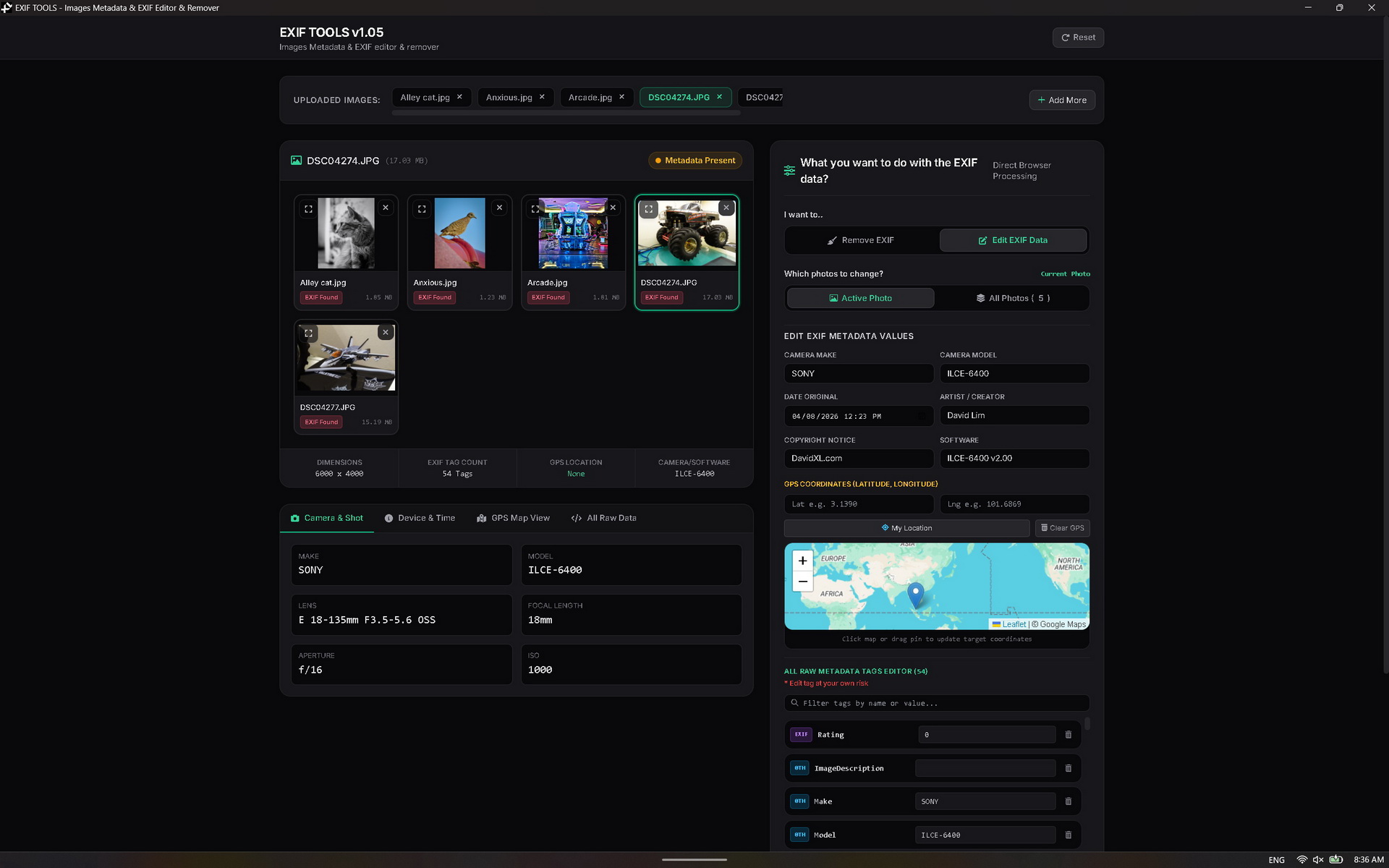
So my EXIF TOOLS is a privacy and image utility application designed to read, edit, and remove the hidden metadata (EXIF data) embedded inside digital photographs. When you take a photo with a smartphone or digital camera, the device invisibly attaches a ton of tracking data to the image file, including your exact GPS coordinates, the date and time, the device model, and camera settings. This app gives you total control over that hidden data.
How can it help you?
-
Metadata Inspection & Mapping
-
View Hidden Data: Instantly see all hidden tags (Camera Make/Model, ISO, Shutter Speed, Software used).
-
GPS Extraction: If a photo contains GPS coordinates, the app extracts them and plots the exact location on an embedded interactive map.
-
-
Privacy Protection (Remove EXIF)
-
1-Click Purge: Strips 100% of the metadata from your images. This is crucial for privacy before uploading photos to social media or sending them to strangers, as it removes the exact GPS coordinates of your home, workplace, or vacation spots.
-
-
Metadata Editing & Spoofing
-
Modify Tags: Change the copyright info, artist name, creation date, or camera model.
-
Spoof Location: Manually drop a pin on the map or type in new GPS coordinates to fake where a photo was taken.
-
Advanced Raw Editor: Edit or delete deep technical EXIF tags at the raw JSON level.
-
-
Batch Processing & Format Conversion
-
Bulk Operations: Upload dozens of photos and clean or edit all of them simultaneously, downloading the results as a single ZIP file.
-
Format Conversion: Save the cleaned photos in their original format, or convert them on the fly to JPEG, PNG, or WebP while adjusting the image quality.
-
-
100% Local & Secure
-
No Cloud Uploads: The application processes all images directly inside your device's memory (in the browser or desktop wrapper). Your personal photos are never uploaded to an external server, guaranteeing total privacy.
-