
PHOTO EDITOR | PC | Use Now
What is this?
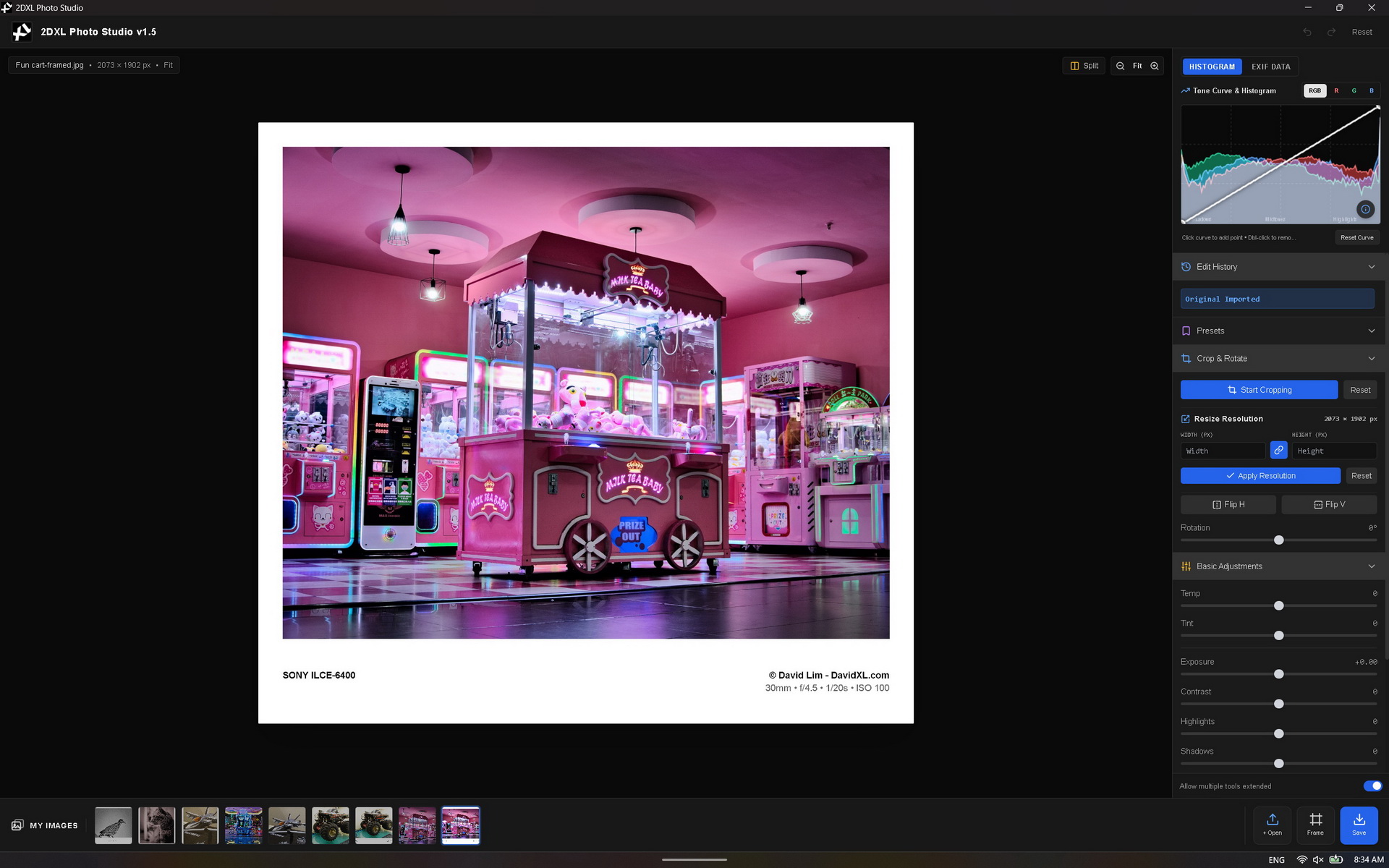
2DXL Photo Studio is a Client-Side Photo Editing and Framing Application. I created this because i need a quick "to go" last minutes photo touch up, edit some EXIF data and add professional customized 'photo framing' aesthetics before publishing online. Its a great "last moment" photo touch up tools for photography.....also my hobby is photography which is why i must have this at my photography website here: https://photo.davidxl.com
What can it do?
1. Professional Color & Light Editing
The app features a "Develop" module similar to Adobe Lightroom, offering real-time, non-destructive slider adjustments:
-
Basic Light: Exposure, Contrast, Highlights, Shadows, Whites, and Blacks.
-
Color & Presence: Temp (White Balance), Tint, Vibrance, Saturation, Clarity, and Dehaze.
-
Effects: Vignette, simulated Film Grain, and Sharpening.
-
Color Grading: Three-way color wheels/pickers for tinting Shadows, Midtones, and Highlights independently.
-
Tone Curve: Fully interactive curve adjustments for the master RGB channel, as well as independent Red, Green, and Blue channels.
2. Photo Frame Studio & Batch Processing
A dedicated module for preparing photos for social media or digital galleries:
-
Custom Frames: Apply stylish borders like "Classic White", "Gallery Art", or "Polaroid".
-
Dynamic Typography: Automatically prints the camera's EXIF data (Camera Model, Lens, ISO, Aperture, Shutter Speed, Author) beautifully formatted onto the frame's border.
-
Custom Positioning: Allows you to drag and drop the text anywhere on the frame with a grid-snapping feature.
-
Batch Rendering: You can select multiple photos from your filmstrip and apply the exact same frame, thickness, and EXIF typography to all of them at once, saving them sequentially.
3. Complete EXIF Metadata Management
-
Read & Edit: Automatically extracts deep metadata from your photos (Camera settings, GPS, Copyright). You can manually edit these fields in the UI.
-
Preservation: When you save your edited JPEG, the app uses a custom injection engine (piexifjs) to permanently embed your EXIF data back into the final file, ensuring your copyright and camera settings are never lost.
4. Workflow & UI Tools
-
Split View: A draggable Before/After slider to compare your edits with the original image.
-
Interactive Cropping & Transforming: Freeform crop, locked aspect ratios (16:9, 1:1, etc.), rotation, and image resizing.
-
Edit History: A step-by-step history log allowing you to undo/redo or jump back to any point in your editing process.
-
Presets: A library of 1-click built-in styles (e.g., Teal & Orange, Moody Dark, Vintage).